Korean App Store screenshots: how to localize them
Korean is the default App Store language in the Republic of Korea, and it looks very different from English on a screenshot: its own script (Hangul), spaces between words but different rules for where a line may break, and a choice of speech level that English doesn't have. This guide covers what to change in your screenshot captions and store text for Korean, on both the App Store and Google Play. Updated 29 October 2026.
Which App Store storefronts show Korean
In Apple's App Store localizations table, Korean appears for two countries or regions:
| Country or region | Default language | Additional supported language(s) |
|---|---|---|
| Republic of Korea | Korean | English (U.K.) |
| United States | English (US) | Arabic, Chinese (Simplified), Chinese (Traditional), French, Korean, Portuguese (Brazil), Russian, Spanish (Mexico), Vietnamese |
What this means in practice:
- Korean is the default only in the Republic of Korea. That's the storefront a Korean localization is mainly for.
- Korean is also an additional language in the United States. It's one of nine additional languages Apple lists for the US storefront, so your Korean listing can also reach people there.
- Korea's additional language is English (U.K.), not English (US). If you only have an English (US) listing, check what Korean customers who don't use Korean will actually see.
- There's one Korean. Apple's list of metadata languages has a single "Korean", so you write one Korean localization.
Apple also notes that the language a customer sees depends on the App Store language for their location, their device's language settings, the languages you've added and your primary language. So treat the table as a guide, not a guarantee.
Full list of all 50 languages and every country's default: App Store localization languages.
Writing Korean captions that fit
Korean puts spaces between words
Unlike Japanese and Chinese, Korean uses spaces (our Japanese guide covers how Japanese breaks lines without them). W3C's Requirements for Hangul Text Layout and Typography (KLReq) puts it simply: "In principle, Korean words are separated by spaces." So a Korean caption breaks into words the way an English one does, and the spaces matter.
Two things follow from that:
- Spacing can change the meaning. Microsoft's Korean style guide says that "space is an important issue in Korean", and that compound words are generally written without a space (its examples include 손가방, not 손 가방). It also shows a pair whose meaning depends on the space alone: 작은 아버지 means "a father with short height", while 작은아버지 means a father's younger brother. Have a native speaker check the spacing as well as the words.
- No space between a Latin word and a Korean particle. KLReq notes that when a word in the Latin script is followed by a Korean grammatical particle, "there is no space between the Latin text and the following Korean characters". Our homepage demo writes "Tempo와 함께라면…", not "Tempo 와".
Break lines between words, not inside them
KLReq describes two ways to break Korean lines: "If a line ends in Hangul, line breaking is done on character or word basis." Both are allowed, and the writer chooses. Character-based breaking can split a word across two lines; word-based breaking keeps each word whole.
For a two- or three-line headline, we recommend breaking only between words. A word split across two lines is harder to read at a glance. (That's our recommendation for headlines; KLReq allows both.)
If your screenshots are built in HTML or a web-based tool, CSS can do this for you. MDN describes word-break: keep-all as: "Word breaks should not be used for Chinese/Japanese/Korean (CJK) text." For non-CJK text, MDN says, keep-all behaves like normal. Our reading: with keep-all, Korean breaks at spaces, the way English does. In a design tool, check each line break by eye.
KLReq also lists characters that shouldn't start or end a line. A line can't start with a closing bracket, a hyphen, a full stop or comma, a middle dot or dividing punctuation such as ? and !, and an opening bracket can't end a line. With short headlines, watch for a punctuation mark that wraps onto a line by itself.
Use Western punctuation, and no ALL CAPS problem
- Commas and full stops are the Latin ones. KLReq says that in horizontal writing Korean uses the half-width comma "," and full stop ".", and keeps the ideographic 、 and 。 for vertical writing. So don't copy Japanese punctuation into Korean captions.
- Quotation marks in horizontal Korean are the curly ‘ ’ and “ ” (KLReq).
- There's no upper or lower case in Korean syllables (KLReq). Uppercase styling only affects any Latin words in the caption.
- Full stops on headlines: Mozilla's Korean style guide translates a string without a full stop as a noun phrase (its example: "Update failed" becomes 업데이트 실패), and one with a full stop as a complete sentence. Our caption guide recommends no full stop on captions, so noun-phrase captions fit well. Whatever you pick, use the same style on every screenshot.
Korean captions are shorter, but each block is bigger
Each Hangul syllable is one character that combines several letters (jamo, in KLReq's terms), so a Korean caption often has fewer characters than the English one. Here's the Tempo demo set from our homepage, English caption next to the Korean one HelloPack produced:
| English caption | Korean caption | Characters (EN → KO) |
|---|---|---|
| Every set, planned for you. | 나만을 위한 맞춤형 세트 | 27 → 13 |
| See your strength go up. | 강해지는 과정을 확인하세요 | 24 → 14 |
| A plan for every goal. | 목표에 맞는 완벽한 계획 | 22 → 13 |
(Counts include spaces and punctuation.) In this set every Korean caption has about half the characters of the English one. That's three captions from one demo app, not a general rule, and fewer characters doesn't mean you can use less space. Each syllable packs several letters into one character, and in our experience dense syllables get hard to read at small sizes. Keep the type size you use for English, and if a caption doesn't fit, shorten it rather than shrinking the font.
Choose a font that really has Hangul
- Check the whole character set. KLReq notes there are 11,172 precomposed Hangul syllables. A Latin-only brand font has none of them, so the device or tool falls back to some other Korean font, which may not match your weight or style. Pick a Korean font yourself.
- A free option: Google Fonts describes Noto Sans KR as a sans-serif "design for the Korean language using Hangul and the Korean Hanja scripts" that also supports Latin, and it comes in nine weights, from Thin to Black. That makes it easy to match the weight of your English headline.
- Avoid italics. Microsoft's Korean style guide says bold can be used as in English, but "italic font is recommended to remove for better readability".
- Check Latin words too. App names and numbers often stay in Latin letters inside Korean text. Make sure they look right next to the Hangul.
Pick a speech level and keep it
Korean verb endings show how formally the writer addresses the reader, and English copy doesn't say which level to use. Three are relevant for app copy:
- 합니다체 (formal polite). Wikipedia's article on Korean speech levels calls this level (하십시오체, also called 합쇼체; its present form is 합니다) the "formal" or "formal polite" style, and lists its use by TV announcers and "to customers". Example: 운동 계획을 제공합니다 ("provides a workout plan").
- 해요체 (polite, less formal). The same article calls it "casually polite", the style most phrasebooks for foreigners use. Example: 운동 계획을 세워요 ("make a workout plan").
- 반말 (informal). Wiktionary describes 반말 as truncated speech that drops the endings showing social differences, with 해체 as a common example. Wikipedia lists 해체 for close friends and relatives and when talking to children. Example: 운동 계획을 세워 ("make a workout plan", casual). Wiktionary's definitions include "talking down to". A brand can use it on purpose to sound close and casual, but for most apps it's a risk with customers. (That's our judgement, not a rule from a style guide.)
Established style guides lean polite and conversational:
- Microsoft's Korean style guide says to use "—세요 instead of—십시오" because it "conveys more natural and conversational user experiences", and to keep —십시오 for EULA or legal content. Its own examples mix 합니다 statements with —세요 requests: the same table has 사용할 준비가 되었습니다 ("ready to use") and 다시 시도해 보세요 ("try again").
- Mozilla's Korean style guide says to use 합쇼체, based on honorific language rather than commands. Yet its examples mark the —세요 form 번역을 하세요 as correct and the —십시오 form 번역을 하십시오 as wrong.
Our Tempo demo follows the same pattern: two noun-phrase captions, one —세요 caption (강해지는 과정을 확인하세요, "see your progress as you get stronger"), and a description that mixes 합니다 statements with —세요 requests. Noun phrases have no verb ending, so they fit with either level. What reads badly is a switch in register: 반말 on the screenshots and 합니다체 in the description, or polite statements that end in —해요 on one screenshot and —합니다 on the next. Apple advises you to "communicate in the tone of your brand" in the description. Apple only says this about the description, but we suggest using the same level in the captions and subtitle too. (That's our recommendation; neither Apple nor Google sets a Korean speech level.)
Particles after your app name
Some Korean particles come in pairs, and which one is right depends on the word before it, as Mozilla's guide notes. Software strings often write both, and Microsoft's guide tells translators to use the double forms 은(는), 이(가), 을(를) and 과(와) after placeholders, "since you do not know what words will replace placeholders". In a caption you do know the word, so pick the one particle that fits your app name, and don't use the double form. (Mozilla's guide does the same for brand names: it assumes "Firefox" and uses 가 and 는.) If you're not sure which one fits your name, ask a native speaker.
Example: a Korean set from our demo app
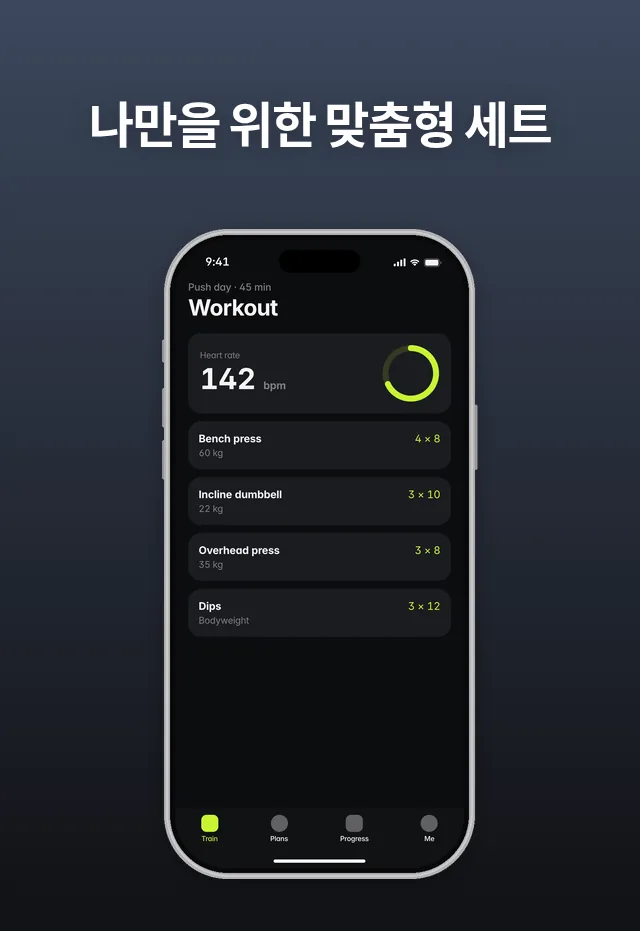
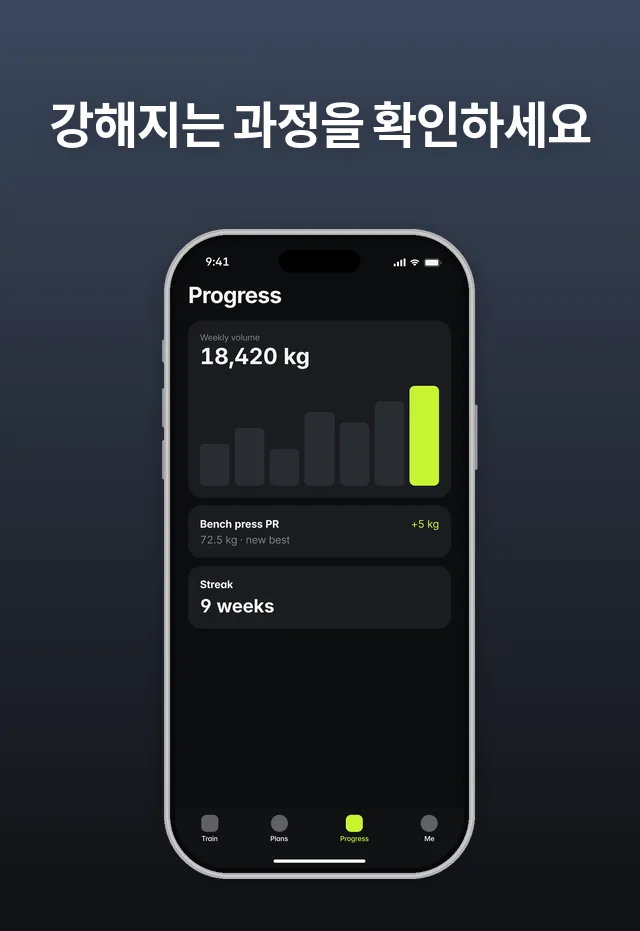
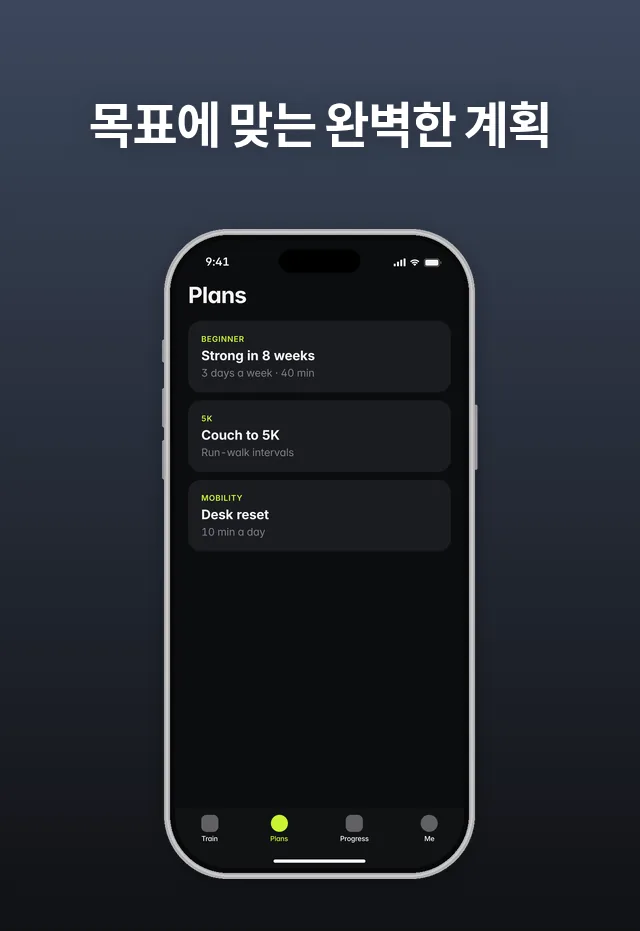
Tempo is a demo app we made to show HelloPack's output. It isn't a customer. These are real HelloPack renders, also shown on our homepage.
Things to notice:
- Each Korean caption fits on one line. The English caption "Every set, planned for you." takes two lines at the same width.
- The noun-phrase captions (나만을 위한 맞춤형 세트, 목표에 맞는 완벽한 계획) have no full stop, and neither does the —세요 caption, so all three look the same.
- Only the captions change. The app UI inside the phone stays in English, because the demo app itself isn't localized. Only show a Korean UI if your app really ships in Korean.
Keywords and store text in Korean
The App Store keyword limit: Apple's docs disagree
Apple doesn't give one consistent answer on how the keyword field is counted:
- App Store Connect Help (Platform version information) says: "You can provide up to 100 bytes of content."
- Apple's "Creating your product page" guide says: "Keywords are limited to 100 characters total."
For Korean the difference is large. Hangul syllables sit at U+AC00 to U+D7A3 (KLReq), and UTF-8 encodes every character from U+0800 to U+FFFF in 3 bytes (RFC 3629). RFC 3629's own example is 한국어 ("the Korean language"): 3 syllables, 9 bytes. So 100 bytes holds about 33 Hangul syllables, while 100 characters would hold 100. We haven't confirmed which rule App Store Connect enforces, so write to the stricter reading: stay within 100 bytes, and check the counter in App Store Connect before you submit. (HelloPack counts keywords in bytes for this reason.)
The Korean keywords HelloPack wrote for Tempo show how this works:
운동,헬스,계획,트레이닝,심박수,기록,중량,피트니스,러닝,다이어트
That's 36 characters (27 syllables and 9 commas) and 90 bytes, so it fits within 100 bytes. The same number of English keywords would leave far more room.
Other keyword rules from Apple that apply in Korean:
- Separate terms with commas and no spaces after the commas. Apple does allow spaces inside a keyword phrase ("Real Estate"), but each space costs a byte.
- App Store Connect Help describes keywords as "each greater than two characters". Many Korean words are two syllables (운동 "exercise", 기록 "record"). Apple doesn't explain how this rule applies to them, so check for warnings in App Store Connect.
- Don't repeat your app name or company name. Apple already searches them.
- Research keywords in Korean; don't translate your English list. Apple suggests tailoring keywords to each market. Tempo's list has both 운동 ("exercise") and the English loanword 피트니스 ("fitness"): close in meaning, but different search terms.
Name, subtitle and description
The app name and subtitle are 30 characters each on the App Store. Korean usually fits a full benefit into far fewer characters; Tempo's Korean subtitle, 근력 및 러닝 코치 ("strength and running coach"), is 10. Use the room for a clear benefit, not more keywords. Apple advises against generic claims like "world's best app" in the subtitle. Every limit is in our character limits guide.
Google Play notes for Korean
- Language code: Korean is ko-KR in Play Console's list of translation languages.
- Character limits are the same for every script: app name 30, short description 80, full description 4000. Google says these limits "apply to both full-width and half-width characters".
- No free machine translation for Korean. Play Console's free machine translation of store listings covers ten languages, and ko-KR isn't one of them. You can add your own Korean translation, or use Google's paid human translation from third-party vendors, which "costs as little as USD 0.07 per word". Google says translations "aren't available for all source and target language combinations", so check that yours is offered.
- Without a Korean listing, users can view an automated translation of your store listing text. Your graphics still show in your default language, though. If you add Korean text but no Korean screenshots, Korean users see your English screenshots.
- Google's screenshot text recommendations apply in Korean too. Google recommends that taglines take up no more than 20% of the image, that they avoid words like "Best", "#1", "Top", "New", "Discount" or "Sale", and that taglines and text overlays be localized. Google's examples are in English; our reading is that Korean equivalents such as 최고 ("best"), 1위 ("number one") or 할인 ("discount") should be avoided too. Google also says "In-game UI does not need to be localized per market."
- Targeting Korea instead of the Korean language: translations follow the user's language preference. To show a different listing to users in a specific country, Google recommends custom store listings.
Sizes and every other Play rule: Google Play screenshot size and Google Play store listing localization.
Korean checklist
- Add a Korean localization in App Store Connect and ko-KR in Play Console.
- Pick a speech level (polite —세요 / 합니다 for most apps) and use it in captions, subtitle and description.
- Write short English captions first (2–6 words), then check every Korean line break.
- Break lines only between words, never inside one (
word-break: keep-allin CSS). - No space between a Latin app name and its particle, and use the one particle that fits your name (와 or 과, 는 or 은), never 은(는).
- Use "," and ".", not 、 and 。, and the same full-stop style on every screenshot.
- Use a font with full Hangul coverage in a weight that matches your English; avoid italics.
- Research Korean keywords. Stay within 100 bytes (each syllable is 3 bytes) and check the counter in App Store Connect.
- Keep the app UI in its real language.
- Get a native speaker to read the full set, spacing included, before you upload.
- Export every size you ship: see App Store screenshot sizes and iPhone Duo sizes.
Korean screenshots with HelloPack
Upload the screenshots you already have. HelloPack translates the captions into Korean and keeps your design, for all 6 store sizes (iPhone 6.3″, iPhone 6.9″, iPhone 6.5″, iPhone Duo outer, iPhone Duo inner and Google Play phone). Korean captions keep words together and break lines only at spaces, and they're set in a Noto Korean font (Noto Sans CJK KR, or Noto Serif CJK KR if your design uses a serif font). Only a single word too long for a line even at the minimum font size would be split. If a caption doesn't fit, HelloPack shrinks the font down to a set minimum size and wraps the caption onto up to three lines. It never cuts text off. It also writes the Korean App Store and Google Play listing natively (not word for word), with keywords counted in bytes. Only the captions are translated. HelloPack never changes the text inside your app's screens. Your zip has the Korean files in a ko - Korean folder for each size, and a Text/all-languages.md file with every caption side by side, so you or a Korean speaker can check the wording.
Korean gets an extra native review step. On the Indie and Pro plans it costs more credits: 2.5 credits per screenshot instead of 0.1 for most languages. The Launch Kit and the free preview don't use credits (how credits work).
Try Korean free: pick Korean as one of your first 2 languages, and the free preview renders it in every size you pick, with no card needed (up to 3 previews a day). Pair it with a language close to English, such as German, to see both a long caption and a different script before you pay. After that, it's $19 once for the Launch Kit, or $12/month (Indie, 3 apps) or $24/month (Pro, 10 apps).
Only need the sizes? The free iPhone Duo screenshot resizer runs in your browser.
Guides for other languages
Localize your screenshots in your own design. Upload the screenshots you have and see 2 languages free, no card needed.
Get your free preview Free screenshot resizerFAQ
Which App Store countries use Korean? In Apple's localizations table, Korean is the default language in the Republic of Korea, and one of nine additional languages in the United States.
Does Korean use spaces between words? Yes. Unlike Japanese and Chinese, Korean words are separated by spaces, and the spacing can change the meaning. Break caption lines at those spaces, not inside a word.
How do I stop Korean words from breaking in the middle?
In CSS, use word-break: keep-all, which stops breaks inside Korean words. In a design tool, check each line by eye and move the break to a space.
Should my Korean screenshots use 해요체, 합니다체 or 반말? Most apps use polite forms. Microsoft's and Mozilla's Korean style guides both prefer the polite —세요 over the stiffer —십시오, and Microsoft combines —세요 requests with 합니다 statements. 반말 can sound like talking down to a customer. Whatever you choose, use it everywhere.
Is the App Store keyword field 100 characters or 100 bytes in Korean? Apple's documents disagree. App Store Connect Help says 100 bytes, and Apple's product page guide says 100 characters. Each Hangul syllable is 3 bytes in UTF-8, so stay within 100 bytes (about 33 syllables) to be safe, and check the counter in App Store Connect.
Does Google Play translate my listing into Korean automatically? Users can view an automated translation of your listing text. But Play Console's free machine translation service doesn't include ko-KR, so for a proper Korean listing you add your own translation or order a paid one. Your screenshots stay in your default language unless you upload Korean ones.
Sources (checked 29 Oct 2026): Apple, App Store localizations · Apple, Platform version information · Apple, Creating your product page · Google, Translate and localize your app · Google, Add preview assets to showcase your app · Google, Create and set up your app · W3C, Requirements for Hangul Text Layout and Typography (KLReq), Group Note Draft, 21 Mar 2026 · MDN, word-break · Microsoft, Korean Localization Style Guide (PDF; §2.1.2 Words and phrases to avoid, §2.2.1 Address the user to take action, §4.1.4 Compounds, §4.1.5 Font localization, §5.4.2 Error messages) · Mozilla, Korean style guide · Wikipedia, Korean speech levels · Wiktionary, 반말 · Google Fonts, Noto Sans Korean · IETF, RFC 3629: UTF-8.