German App Store screenshots: how to localize them
German is the default App Store language in three countries, and it reads differently from English in ways that show up on a screenshot: long compound words, a choice between the informal du and the formal Sie, and a different spelling rule in Switzerland. This guide covers what to change in your screenshot captions and store text for German, on both the App Store and Google Play. Updated 24 October 2026.
Which App Store storefronts show German
In Apple's App Store localizations table, German appears for four countries or regions:
| Country or region | Default language | Additional supported language(s) |
|---|---|---|
| Germany | German | English (U.K.) |
| Austria | German | English (U.K.) |
| Switzerland | German | English (U.K.), French, Italian |
| Luxembourg | English (U.K.) | French, German |
What this means in practice:
- One German localization covers all four. Apple's list of metadata languages has a single "German". There's no separate Austrian or Swiss German to fill in, so write German that works in all three German-speaking countries (see the Swiss spelling note below).
- In Luxembourg, German is an additional language, not the default. The default there is English (U.K.).
- Switzerland has four storefront languages. If you sell there, French and Italian are the other two localizations Apple lists for it, besides English (U.K.).
- German isn't listed for some places you might expect. Belgium's additional languages are Dutch and French, and Liechtenstein doesn't appear in the table at all. The United States storefront lists nine additional languages, and German isn't one of them.
Apple also notes that the language a customer sees depends on the App Store language for their location, their device's language settings, the languages you've added and your primary language. So treat the table as a guide, not a guarantee.
Full list of all 50 languages and every country's default: App Store localization languages.
Writing German captions that fit
Compound words make single long "words"
German joins nouns into one word where English uses several. W3C's article on text size in translation uses this example: the English "Input processing features" may become "Eingabeverarbeitungsfunktionen" in German. English can wrap that phrase across two lines; the German "may not wrap automatically", as W3C puts it, and can break a tight layout.
Screenshot captions are exactly that kind of tight layout. Our demo set below has the compounds Lesefortschritt ("reading progress"), Leseserie ("reading streak") and Leseziel ("reading goal"). Each is one word in German, so a line can't break inside it the way "reading progress" can break between two words.
What helps:
- Keep headlines short in English first. Our caption guide uses 2 to 6 words and 40 characters at most. A short English caption gives the German room.
- Don't build long compounds just to save space. Microsoft's German style guide writes compounds of up to three parts as one word, and uses a hyphen for longer ones, for example Echtzeit-Konvertierungsfrequenz. It also says overly long or complex compounds should be avoided. A short verb phrase often reads better than a four-part noun.
- Hyphenate German-English mixes. Mozilla's German guide states it as a rule: English-German word combinations are connected with hyphens (its examples: Open-Source-Initiative, Non-Profit-Organisation). Microsoft's guide says compounds of German and English components "are often hyphenated". If your caption has an English feature name, expect a hyphen.
- Avoid breaking a word across lines in a headline. A two- or three-line caption reads best when each line ends at a word boundary. If a compound doesn't fit on one line, shorten the caption rather than splitting the word. (This is our recommendation for headlines, not a German grammar rule.)
German is often longer, but not always
W3C quotes IBM's "average expected expansion rates for text translated from English into European languages". Short strings grow the most: a string of up to 10 English characters grows to 2–3 times its length (200–300%) on average, and one of 21–30 characters to 160–180% of its length. W3C's own example is "views" becoming the Italian "visualizzazioni": 5 characters to 15, which it calls a 300% expansion. Those are averages across European languages, not a German-specific figure.
In practice it varies by caption. Here's our BookWorm demo set, English caption next to the German one HelloPack produced:
| English caption | German caption | Characters (EN → DE) |
|---|---|---|
| Track your reading progress | Verfolge deinen Lesefortschritt | 27 → 31 |
| Track every book and audiobook | Behalte alle Bücher & Hörbücher im Blick | 30 → 40 |
| See how much you really read | Entdecke, wie viel du wirklich liest | 28 → 36 |
| Keep your reading streak alive | Behalte deine Leseserie bei | 30 → 27 |
| Hit your monthly reading goal | Erreiche dein monatliches Leseziel | 29 → 34 |
Four of the five got longer, by up to a third. One got shorter. So leave room in the design: don't size the caption box to the English text, and check the longest German caption, not the average.
Leave room in the layout
- Give captions two or three lines of space, not one tight line.
- Keep the same type size you use for English. If a caption still doesn't fit, rewrite it shorter before you shrink the font.
- Check that your font has ä, ö, ü and ß in the same weight. Most Latin fonts do, but custom display fonts sometimes don't.
- Watch ALL CAPS. Duden notes that in capitals, ß is traditionally written SS (STRASSE), and a capital ẞ exists but is optional. Sentence case avoids the question, and it's what our caption guide recommends anyway.
Du or Sie: pick one and keep it
German has an informal "you" (du) and a formal one (Sie). English copy doesn't say which to use, so you have to choose. It's a brand decision, and established style guides choose differently:
- Mozilla's German marketing guide uses du. Mozilla says it decided to address its German users with du because it's "less complicated, more emotional and more activating", and writes du in lowercase except at the start of a sentence.
- Microsoft's German style guide uses Sie in its examples ("Möchten Sie fortfahren?"), and says to use the informal du when addressing children and teens under 18.
Our BookWorm demo captions came out in du ("Verfolge deinen Lesefortschritt", "Behalte deine Leseserie bei"). That suits a casual reading tracker. A banking, legal or B2B app may prefer Sie. Neither is wrong. What reads badly is mixing them, for example du on the screenshots and Sie in the description. Apple advises you to "communicate in the tone of your brand" in the description; we suggest using the same form in the captions and subtitle too.
Sie captions are usually a little longer ("Erreichen Sie Ihr monatliches Leseziel" vs "Erreiche dein monatliches Leseziel"), so check the fit again if you switch.
Switzerland doesn't use ß
Duden states that in Switzerland and Liechtenstein, ß is generally replaced by ss (Strasse instead of Straße). The Swiss Federal Chancellery's spelling guide says the same for Swiss federal texts, and notes that texts from other German-speaking countries have to be adapted, not simply copied over.
Because the App Store has one German localization for Germany, Austria and Switzerland, your German captions will show in all three. Words with ß are correct in Germany and Austria and will look slightly foreign to Swiss readers. If Switzerland matters to you, you can avoid words with ß in your headlines. On Google Play you can go further with a custom store listing for Switzerland (see below).
Example: a German set from our demo app
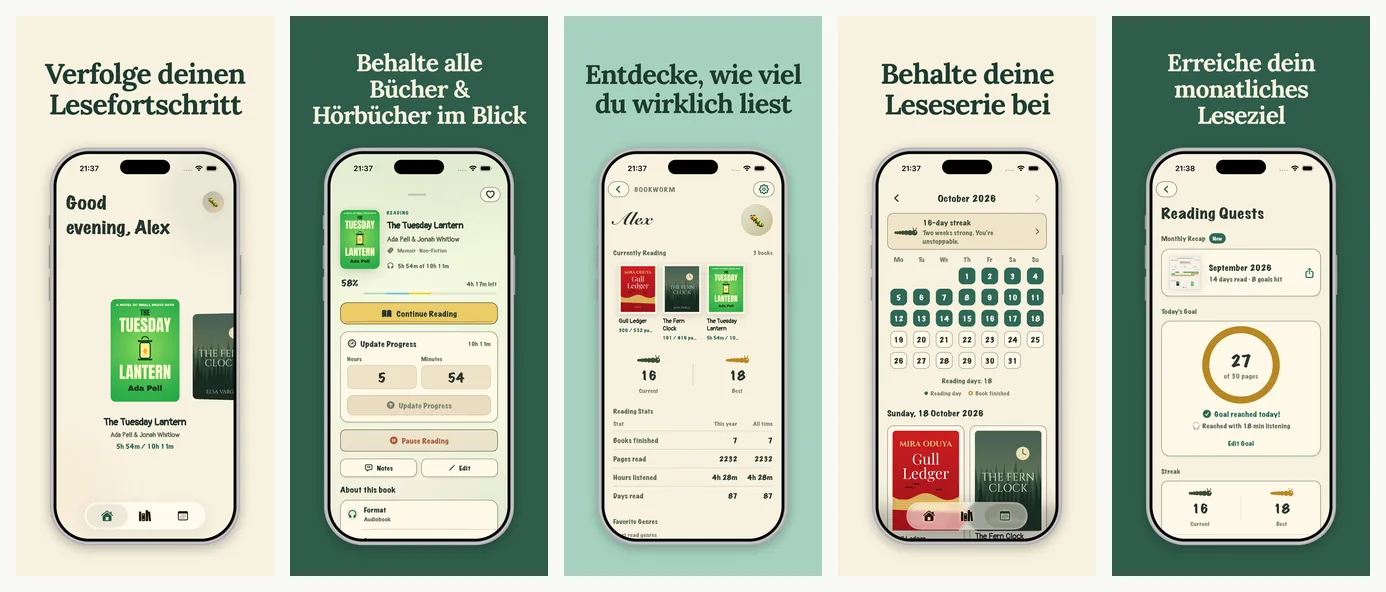
BookWorm is a demo app we made to show HelloPack's output. It isn't a customer. This is a real HelloPack render.
Things to notice:
- The long compounds sit on their own line ("Lesefortschritt", "Leseziel"), and no word is split.
- The longest caption, "Behalte alle Bücher & Hörbücher im Blick", takes three lines.
- Only the captions change. The app UI inside the phone stays in its original language, because the app itself isn't localized. Only show a German UI if your app really ships in German.
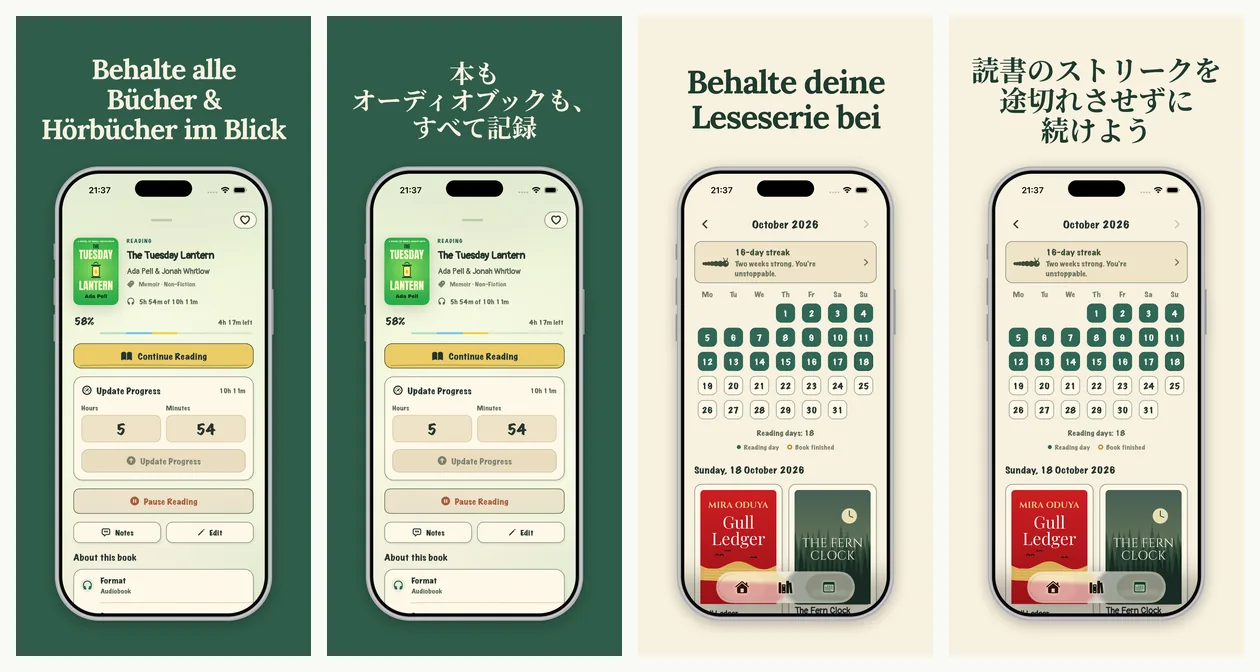
The same captions next to Japanese, which is far shorter in characters but needs more care with line breaks (see our Japanese guide):
Keywords and store text in German
The App Store keyword limit: Apple's docs disagree
Apple doesn't give one consistent answer on how the keyword field is counted:
- App Store Connect Help (Platform version information) says: "You can provide up to 100 bytes of content."
- Apple's "Creating your product page" guide says: "Keywords are limited to 100 characters total."
For German the gap is small but real. Plain letters take 1 byte each in UTF-8, but ä, ö, ü and ß take 2 bytes each (RFC 3629 encodes every character from U+0080 to U+07FF in two bytes). A keyword list full of umlauts can be under 100 characters and over 100 bytes. We haven't confirmed which rule App Store Connect enforces, so write to the stricter reading: stay within 100 bytes, and check the counter in App Store Connect before you submit. (HelloPack counts keywords in bytes for this reason.)
Other keyword rules from Apple that apply in German:
- Separate terms with commas and no spaces.
- Each keyword should be "greater than two characters", per App Store Connect Help.
- Don't repeat your app name or company name. Apple already searches them.
- Apple suggests skipping plurals of words you already have in singular form. German plurals often change the word itself (Buch, Bücher), and Apple doesn't say how its search handles that in German. Test it rather than assume.
- Research keywords in German; don't translate your English list. Apple suggests tailoring keywords to each market.
Name, subtitle and description
The app name and subtitle are 30 characters each on the App Store. German often needs more characters than English for the same idea, so the subtitle is where you'll feel it most. Lead with one clear benefit. Apple advises against generic claims like "world's best app" in the subtitle. Every limit is in our character limits guide.
Google Play notes for German
- Language code: German is de-DE in Play Console's list of translation languages. It's the only German entry; there's no separate Austrian or Swiss German.
- Character limits: app name 30, short description 80, full description 4000.
- Free machine translation is available for German. Play Console's free machine translation of store listings includes de-DE. Google notes these translations "are not reviewed or approved by humans." Google also offers paid human translation from third-party vendors, at "as little as USD 0.07 per word".
- Without a German listing, users can view an automated translation of your store listing text. Your graphics still show in your default language, though. If you add German text but no German screenshots, German users see your English screenshots.
- Google's screenshot text recommendations apply in German too. Google recommends that taglines take up no more than 20% of the image, that they avoid words like "Best", "#1", "Top", "New", "Discount" or "Sale", and that taglines and text overlays be localized. Google's examples are in English; our reading is that German equivalents such as Beste, Neu or Rabatt should be avoided too. Google also says "In-game UI does not need to be localized per market."
- Targeting a country instead of the language: translations follow the user's language preference. To show a different listing to users in a specific country, such as Switzerland, Google recommends custom store listings.
Sizes and every other Play rule: Google Play screenshot size and Google Play store listing localization.
German checklist
- Add a German localization in App Store Connect and de-DE in Play Console.
- Pick du or Sie and use it in captions, subtitle and description.
- Write short English captions first (2–6 words), then check the longest German one.
- Make sure no compound word is split across lines.
- Use a font with ä, ö, ü and ß; prefer sentence case over ALL CAPS.
- If Switzerland matters, avoid ß in headlines, or use a Swiss custom store listing on Google Play.
- Research German keywords. Stay within 100 bytes (umlauts count double) and check the counter in App Store Connect.
- Keep the app UI in its real language.
- Get a native speaker to read the full set before you upload.
- Export every size you ship: see App Store screenshot sizes and iPhone Duo sizes.
German screenshots with HelloPack
Upload the screenshots you already have. HelloPack translates the captions into German and keeps your design, for all 6 store sizes (iPhone 6.3″, iPhone 6.9″, iPhone 6.5″, iPhone Duo outer, iPhone Duo inner and Google Play phone). If a caption doesn't fit, it shrinks the font down to a set minimum size and wraps the caption onto up to three lines, giving it more room. A single word that's still too long for one line, such as a long compound, is split at a hyphenation point from a German dictionary, with a visible hyphen. Only a caption that still doesn't fit gets a slightly smaller font. It never cuts text off. It also writes the German App Store and Google Play listing natively (not word for word), with keywords counted in bytes. Only the captions are translated. The app UI stays as you designed it. Your zip has the German files in a de - German folder for each size, and a Text/all-languages.md file with every caption side by side, so you or a German speaker can check the wording.
German is a standard language on HelloPack: on the Indie and Pro plans it costs 0.1 credits per screenshot, with no extra review surcharge. The Launch Kit and the free preview don't use credits (how credits work).
Try German free: pick German as one of your first 2 languages, and the free preview renders it in every size you pick, with no card needed. Pair it with a language in a different script, such as Japanese, to see a long caption and a different script before you pay. After that, it's $19 once for the Launch Kit, or $12/month (Indie, 3 apps) or $24/month (Pro, 10 apps).
Only need the sizes? The free iPhone Duo screenshot resizer runs in your browser.
Guides for other languages
Localize your screenshots in your own design. Upload the screenshots you have and see 2 languages free, no card needed.
Get your free preview Free screenshot resizerFAQ
Which App Store countries use German? In Apple's localizations table, German is the default language in Germany, Austria and Switzerland, and an additional language in Luxembourg.
Do I need separate German for Austria or Switzerland? Not on the App Store: Apple offers one German localization. Google Play also has a single German language (de-DE), but you can create a custom store listing for a specific country. In Swiss German spelling, ß is written ss.
Should my German screenshots use du or Sie? Either can be right. Mozilla's German guide uses du; Microsoft's uses Sie, with du for under-18s. Choose the one that fits your brand and audience, and use it everywhere.
How much longer is German than English? It depends on the text. In our five-caption demo set, four German captions were 4 to 10 characters longer and one was 3 characters shorter. W3C quotes IBM averages for English strings translated into European languages: a 21–30-character string grows to 160–180% of its length. Those figures aren't German-specific.
Is the App Store keyword field 100 characters or 100 bytes? Apple's documents disagree. App Store Connect Help says 100 bytes, and Apple's product page guide says 100 characters. Umlauts and ß take 2 bytes in UTF-8, so stay within 100 bytes to be safe, and check the counter in App Store Connect.
Does Google Play translate my listing into German automatically? Users can view an automated translation of your listing text, and Play Console offers free machine translation into de-DE. Your screenshots stay in your default language unless you upload German ones.
Sources (checked 24 Oct 2026): Apple, App Store localizations · Apple, Platform version information · Apple, Creating your product page · Google, Translate and localize your app · Google, Add preview assets to showcase your app · Google, Create and set up your app · W3C, Text size in translation · Microsoft, German Localization Style Guide (PDF; §2.2.1 Address the user to take action, §4.2.5 Compounds, §4.2.14 Pronouns) · Mozilla, Tone of Voice & Localization Guide (German) · Duden, s-Schreibung: s, ss und ß (D 160) · Swiss Federal Chancellery, Leitfaden zur deutschen Rechtschreibung (2017) · IETF, RFC 3629: UTF-8.